
Claude
Connect Claude to your Google Ads account
Add the AdCopilot plugin, press Connect, approve once, and ask your first question in the chat you already use.
- Works on Claude's Free plan
- Your own Google sign-in
- It cannot delete
Setup
Six steps, once
Every label below is Claude's own, checked on a Free account. The link in step two opens the plugin's page.
Connect your Google Ads account
Sign up, then sign in with Google itself. You grant access to the accounts you can already open in the Google Ads interface, and nothing widens that.
Add the AdCopilot plugin in Claude
The link below opens the plugin's page in Claude; sign in to Claude first if it asks. The manual route: “Customize” in Claude's sidebar, then “Plugins”, then type AdCopilot into “Search skills and plugins” and open “AdCopilot — Google Ads, Analytics, Search Console & Tag Manager”. Press Add. Claude then warns, as it does for every plugin, that it may include components that run code: press Continue.
Direct link: open the AdCopilot plugin in Claude.

The page the link opens: press Add 
The manual route: Customize, Plugins, then AdCopilot 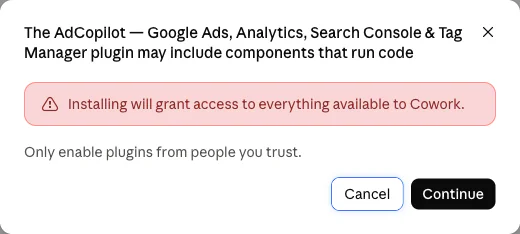
Claude asks this of every plugin: Continue Press Connect: the form is already filled in
Open the plugin's “Connectors · 1” tab, where adcopilot reads “Not added”, and press Connect. Claude opens its “Add custom connector” box with the name and the URL already filled in, so there is nothing to type: press Continue. The next screen already has “Sign in now” and “Use Claude's published identity” chosen, each marked “Detected”. Change neither; scroll down and press Add.

Connectors · 1, then Connect 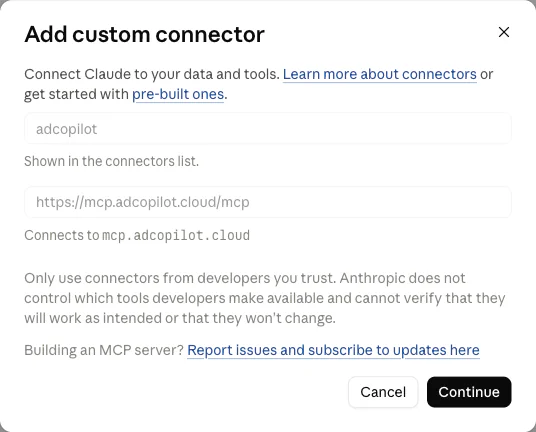
Already filled in: Continue 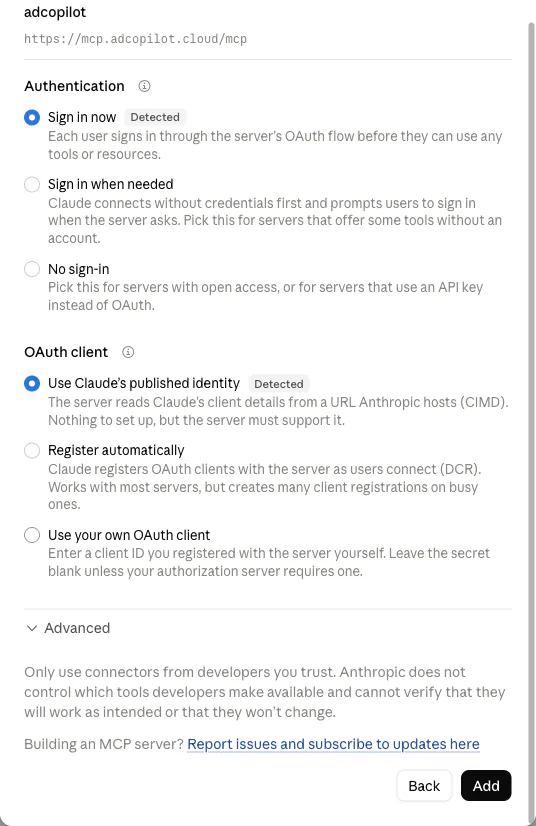
Both marked Detected: leave them, press Add Approve on AdCopilot's page
If Claude first shows the connector's own page, “You're not connected to adcopilot yet”, press Connect there. Our page opens and asks “Let Claude use your AdCopilot?”, listing what Claude will be able to do: press Approve. Back in Claude, adcopilot reads “Connected”. Added AdCopilot by hand before? Claude links the plugin to the connector you already have, because the URL is the same, so you do not get a second one, and it may not ask you to approve again.
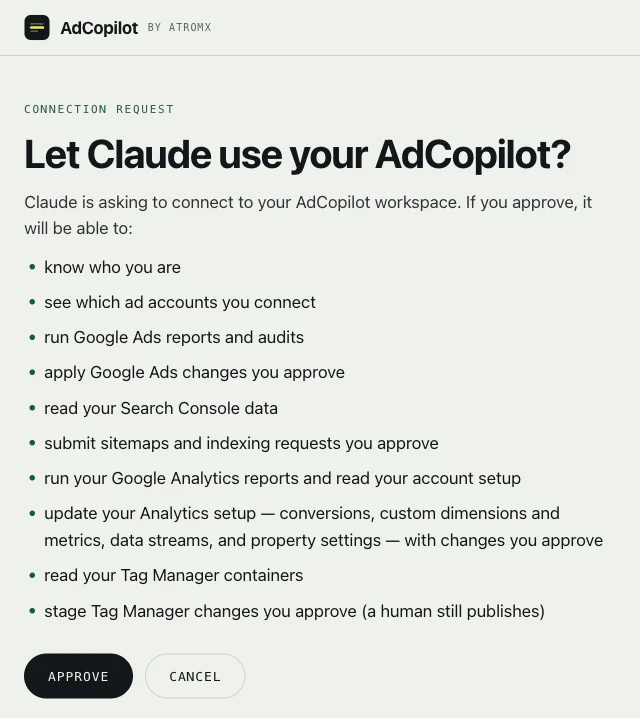
Approve, on our page 
Back in Claude: Connected Tip: let the read-only tools run without asking
Open “Customize”, then “Connectors”, then adcopilot. Under “Tool permissions”, the “Read-only tools” group starts on “Needs approval”, so Claude stops to ask the first time each report runs. Open that group's menu and choose “Always allow”. Leave “Write/delete tools” on “Needs approval”: AdCopilot proposes each change first, and that setting makes Claude ask you before it runs. Either way, AdCopilot can't delete anything except a negative keyword.
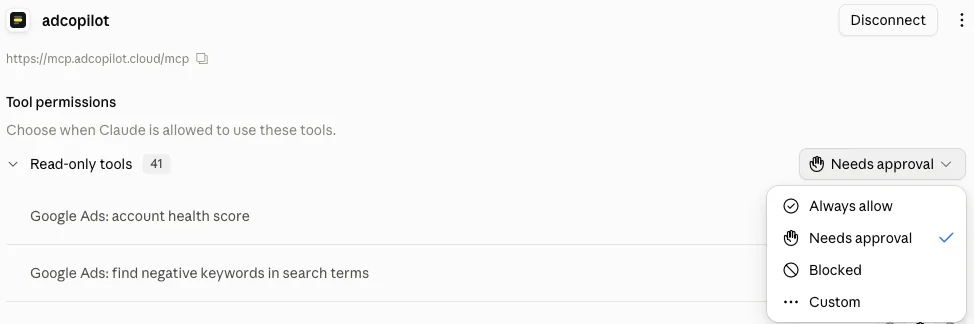
Read-only tools: Always allow Start a new chat and ask
Open a new chat and type “Get me started with AdCopilot”. Claude reads the plugin's get-started skill and checks what is connected on its own; there is nothing to pick with @ first.

The first message
Full step-by-step in the docs: Connect Claude.
The plugin
What the plugin adds
The connector brings the tools. The plugin also brings its skills, its commands and a section of the / menu.
A get-started skill
“Get me started with AdCopilot” sends Claude to the plugin's connect skill first. It checks what is connected, says what each Google product unlocks, and links Google Ads, Analytics, Tag Manager and Search Console to each other in the order that works. Its other skills include how the ads are doing, the morning check, the fixes an audit flags, conversion tracking, a first campaign, Search Console and questions about AdCopilot itself.
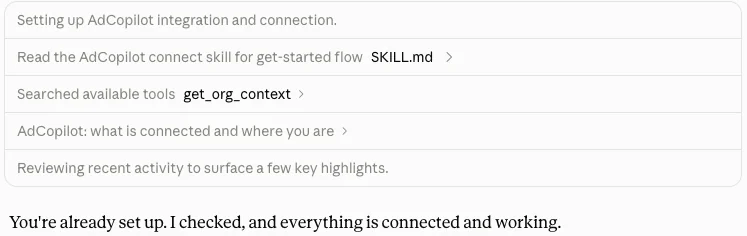
The skill first, then a check of what is connected Its commands
/setup checks the connector and says what each connected product unlocks. /audit runs the full check list, then this month's budget pacing. /daily is the daily check-in, and /weekly the week against the one before. /negatives proposes negative keywords for the searches that cost money and brought nothing. /measure sets up conversion tracking end to end. /launch builds a first Search campaign, switched off until you switch it on. These are the commands of the plugin's current version, the one in its public repository; if Claude installed an earlier version, its Commands tab lists fewer.
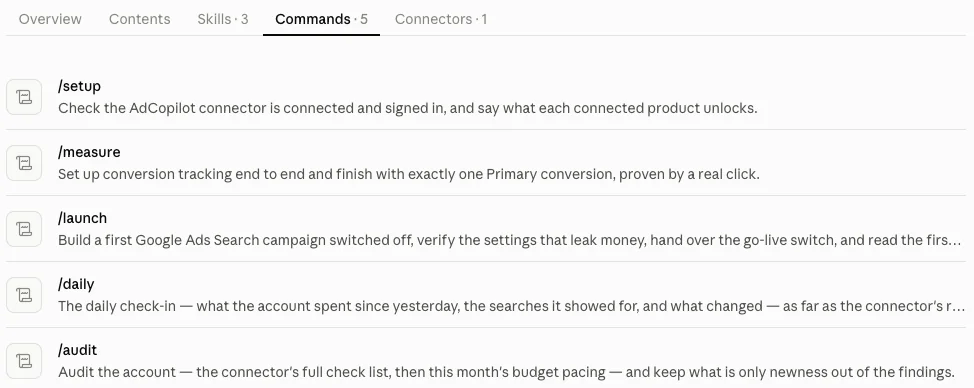
The plugin's Commands tab, in an earlier version A section of the / menu
Type / in any chat and Claude lists the plugin's skills and commands under “AdCopilot — Google Ads, Analytics, Search Console & Tag Manager”. Pick one, or keep typing: /aud is enough to find /audit.
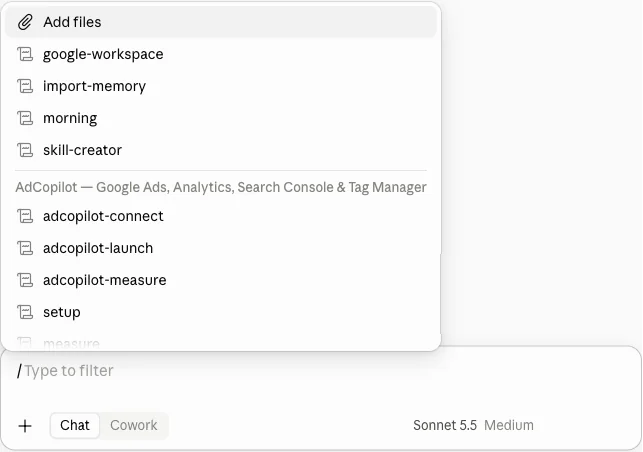
Type / in a chat 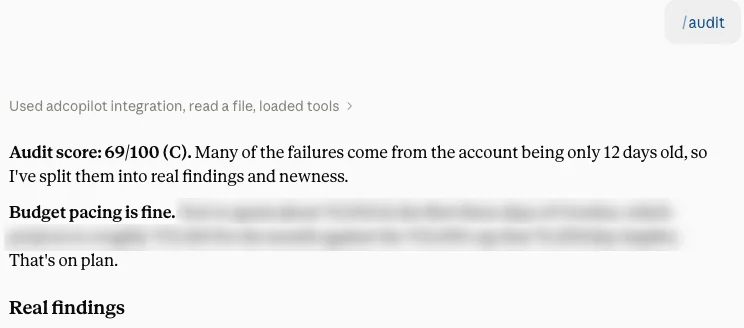
/audit on our own account, spend blurred
Fallback
Plugins switched off? Use a custom connector
The same connector at the same URL, added by hand. It is the way in when an organisation does not allow plugins.
Add AdCopilot as a custom connector instead
The link below opens Claude's “Add custom connector” box; the manual route is “Customize”, then “Connectors”, then “+ Add”, then “Add custom connector”. Type AdCopilot as the Name, paste the URL below, press Continue, leave the sign-in settings as they are, press Add, then Connect, and Approve on our page. The tools are the same; the skills and commands come only with the plugin.
Direct link: open Add custom connector in Claude.
Name AdCopilotConnector URL https://mcp.adcopilot.cloud/mcpGoes in the MCP server URL field. The same URL for every client.
The first turn
What Claude answers first
You ask in plain words, the connector reads the account live, and the answer comes back with the request beside it.
An illustrative first turn: the assistant reads four connected products.

Google Ads
campaigns · spend

Google Analytics
key events

Search Console
verified sites

Tag Manager
tags · triggers
first read, before any change
Where you stand
- Account
- live, spending daily
- Tracking
- one tag quiet for 11 days
- Search terms
- 18% of spend unchosen
- Schedule
- always on, results are not
Start with the quiet tag.
Illustrative session
Asked in Claude's own chat, once the AdCopilot plugin is added and connected under Customize. The connector reads; Claude writes the answer.
Questions
Plans, prompts and the command line
Whether Claude can do this, which plan, a connector added earlier, why it asks, what it changes, the command line, stopping.
Yes, once it has a connector to the Google Ads API. On its own Claude can only write about your account; with the AdCopilot plugin added it reads the account live and, on your instruction, builds campaigns, adds negatives and adjusts bids and targeting — under your own Google sign-in, and it cannot delete.
Claude integrates with any service that offers it a connector, and Google Ads is one of them through AdCopilot. The connection runs on Google's own sign-in: you grant access to the accounts you can already open, Google returns a token for exactly that, and Claude calls the account through our server rather than through a password.
No. The AdCopilot plugin and custom connectors both work on Claude's Free plan; the steps on this page were checked on a Free account. A Team or Enterprise organisation may not allow plugins, and may keep custom connectors to its owners, so an owner may need to add AdCopilot first.
Nothing has to change: the custom connector keeps working. To get the skills and commands, add the plugin too. Claude links it to the connector you already have, because the URL is the same, so you do not end up with two, and it may not ask you to approve again.
Claude starts AdCopilot's read-only tools on “Needs approval”. Open Customize, then Connectors, then adcopilot, and set the “Read-only tools” group to “Always allow”. Leave “Write/delete tools” on “Needs approval”: AdCopilot proposes each change first, and that setting makes Claude ask you before it runs.
What you ask it to, inside limits that hold on our server: it cannot delete, it will not switch on the campaign it built, and it asks for your budget before it builds. Every call is written down, refusals included.
Yes, and it is a couple of typed commands rather than a settings screen. Claude Code installs the same AdCopilot plugin with two commands, or adds the connector with one; both are on our page for any MCP client, under the same sign-in.
Open adcopilot under Customize, then Connectors, in Claude and press Disconnect, and withdraw the Google access from your own Google account. Neither needs us, and both take effect at once. To drop the skills and commands as well, switch the plugin off under Customize, then Plugins.
Ask
Stuck on a plugin screen?
Send the step you are on and what you are seeing, and we will answer.